MEPCO Bill Online Check 2026 – Download Duplicate Bill
To check your MEPCO duplicate bill online, locate the 14-digit reference number or 10-digit consumer ID on any previous bill. Enter this number into the search tool below and click Check Bill. Your current electricity bill will load directly from official Power Information Technology Company (PITC) servers, allowing you to view, print, or save a PDF copy instantly.
MEPCO Bill Check Online
Type the Reference Number or Consumer ID from any earlier bill and your current MEPCO bill opens straight from PITC.
Live PITC billing data- Find the CONSUMER DETAIL box in the top-left corner of any older MEPCO bill, just above your name and address.
- REFERENCE NO is the 14-digit number on the first line. It is a dedicated number allotted to a consumer for identification; the meter number is a separate billing field.
- CONSUMER ID is the 10-digit number on the line below it. Either number opens the very same bill, so use whichever is easier to read.
- Type digits only — spaces appear on their own. PITC has no CNIC or name search, so a CNIC cannot open a bill here; it only helps a MEPCO office trace a lost reference number in person.
The billing tool above connects directly to the central database maintained by PITC to fetch your exact monthly statement. If you want to compare monthly electricity usage, billed amounts, and payments across different billing periods, you can also check your bill history. Designed for quick access on mobile phones and desktop computers, the tool includes several features to simplify monthly bill tracking:
- Dual Search Tabs: Switch easily between the Reference No (14 digits) tab and the Consumer ID (10 digits) tab. While most domestic households use reference numbers, landlords and shopkeepers managing multiple properties often use consumer IDs because they stay attached to the connection permanently.
- Automatic Formatting & Sub-Division Hints: You do not need to type spaces or dashes manually. The input box formats your entry automatically and displays a live helper note below the field.
- Browser Memory Option: Check the box marked “Keep this number on my device for next month” to store your billing number securely in your local browser cache. Returning users can check future bills in one click without re-typing their details.
- Direct Official Server Connection: Your query communicates directly with official PITC web servers (
bill.pitc.com.pk). No personal numbers or billing records are stored on our website, ensuring complete data privacy.
How to Check Your MEPCO Bill Online
Retrieving your duplicate electricity bill takes under a minute. Follow these simple steps to load, download, or print your official statement.
Step 1 — Select Reference Number or Consumer ID
The tool defaults to the Reference No tab, which matches the 14-digit number printed on paper bills. If you prefer to look up your account using your permanent 10-digit account identifier, click the Consumer ID tab on the right side of the search box.
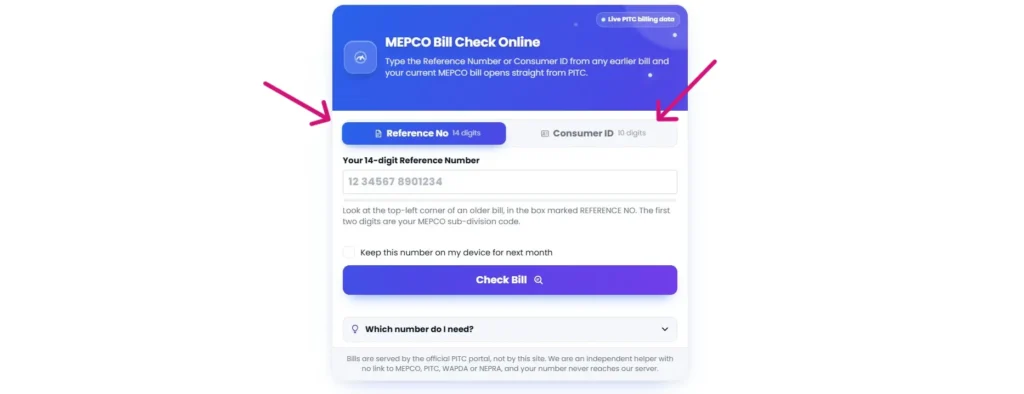
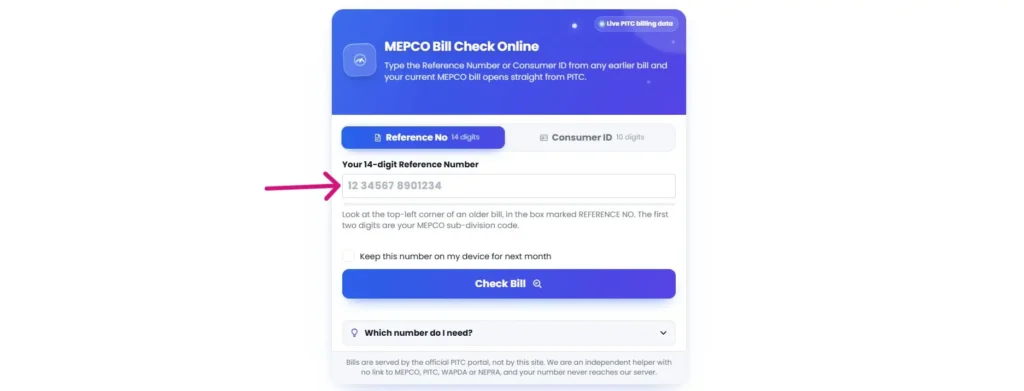
Step 2 — Enter Your 14-Digit Reference Number or 10-Digit Consumer ID
Type your numerical code into the input field. Enter digits only—do not type spaces, hyphens, or special characters manually. The tool formats the string automatically as you type.
Step 3 — Press “Check Bill” to Open Official PITC Document
Click the blue Check Bill button. The tool queries official PITC database servers and opens your complete monthly bill in a new browser tab.
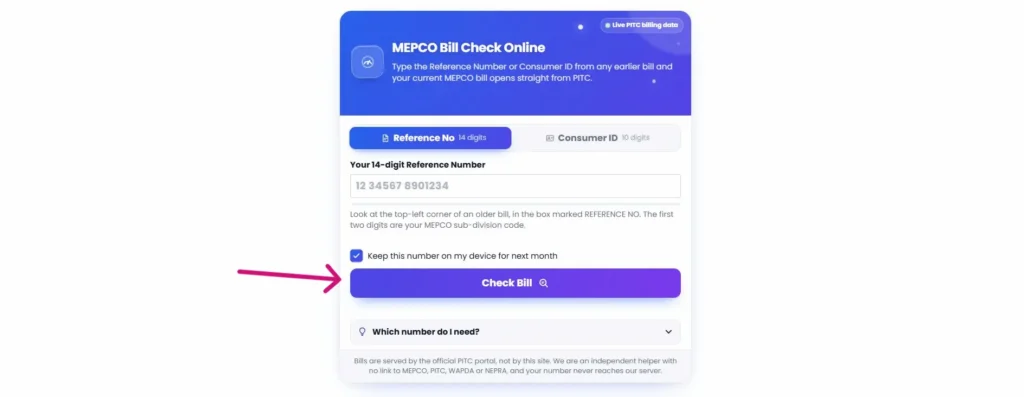
- Troubleshooting Note: If your MEPCO bill does not open immediately, check your web browser’s address bar for a blocked pop-up notification. Allow pop-ups for
mepco-bill.pkand click Check Bill again to display your statement.
Finding Your Reference Number and Consumer ID on a Paper Bill
Understanding the identifiers printed on your physical electricity bill helps you retrieve duplicate copies online without errors. The upper portion of every printed bill contains a dedicated account block.
+-------------------------------------------------------------------+
|                     MEPCO CONSUMER DETAIL                         |
| REFERENCE NO: 12 34567 8901234                                     |
| CONSUMER ID:   1234567890                                         |
+-------------------------------------------------------------------+
Locating the Consumer Detail Box
The Consumer Detail box sits in the top-left section of your printed paper bill, positioned directly above your consumer name, street address, and distribution feeder information.
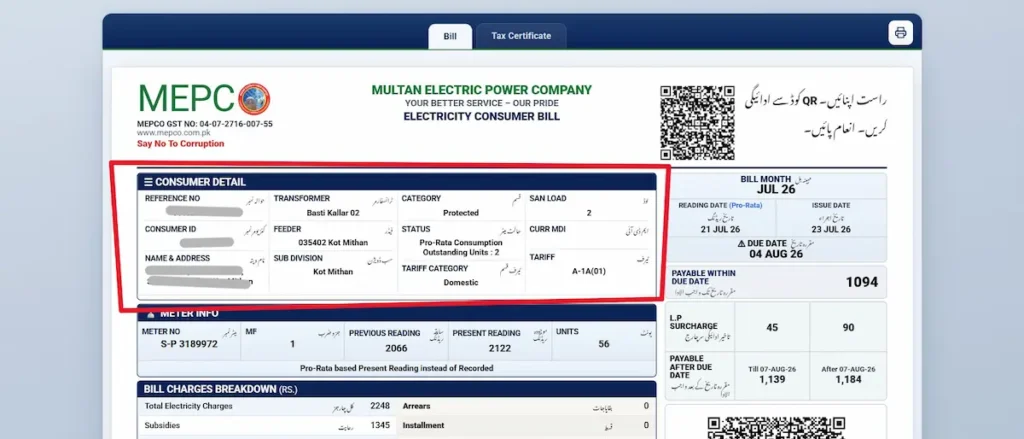
Understanding the 14-Digit Reference Number & Sub-Division Code
The 14-digit reference number is the primary billing identifier assigned to your electric meter connection.
- Sub-Division Code: The sub-division code is a separate component of the reference number.
- Reference Number Structure: The reference number contains separate batch, sub-division and account-number components; the meter number is recorded separately.
Understanding the 10-Digit Consumer ID
The 10-digit Consumer ID sits directly beneath the reference number line in the Consumer Detail box.
- Permanent Account Link: While a reference number can occasionally change if a meter is replaced or upgraded, the Consumer ID remains permanently attached to the physical property connection.
- Property Management: If you manage rental units, commercial shops, or multiple properties, saving the 10-digit Consumer ID ensures you can always access billing statements even if paper bills are lost.
Lost Your MEPCO Bill? How to Retrieve Your Billing Information
Losing a paper bill before making a payment is a common issue. Understanding how official database systems operate prevents wasted time and protects your personal security.
Why Online Bill Lookup by CNIC Is Not Supported
The central Power Information Technology Company (PITC) database server accepts only 14-digit reference numbers or 10-digit consumer IDs. It does not support searches by Computerized National Identity Card (CNIC) numbers, full names, or street addresses.
- Consumer Security Alert: Websites claiming to offer online CNIC bill checks are either inaccurate or are collecting personal information unnecessarily. A standard bill query never requires your CNIC, banking passwords, or One-Time Passwords (OTPs).
- Official CNIC Usage: CNIC is also required in official MEPCO service processes such as change of name, extension or reduction of load, and change of tariff.
5 Verified Methods to Recover a Lost Reference Number
- Mobile Wallet & Banking App History: If you have previously paid a bill using JazzCash, EasyPaisa, SadaPay, NayaPay, or mobile banking apps (such as myABL), open your transaction history. Every digital utility payment receipt permanently logs the 14-digit reference number used.
- Smartphone Downloads & Photo Gallery: Search your mobile phone’s downloads folder for past PDF files or scroll back through your photo gallery to previous months when paper bills arrived.
- Property Owners or Previous Tenants: Contact your landlord, previous property owner, or local neighborhood electrician who may have recorded the account details during earlier setup work.
- MEPCO Official Phone Helpline: Call the official toll-free helpline at 0800-63726. Provide your registered CNIC number and full property address to the support representative, who can trace your reference number from MEPCO’s internal subscriber records.
- In-Person Visit to Sub-Divisional Office: Visit your local MEPCO sub-division customer service desk with your original CNIC and property ownership documents to receive a printed account statement.
Breakdown of MEPCO Electricity Bill Charges & Taxes
Electricity bills in Pakistan consist of several distinct line items governed by National Electric Power Regulatory Authority (NEPRA) guidelines and federal tax laws.
Base Electricity Tariff & Consumption Slabs
Your energy charge is calculated under the applicable NEPRA tariff category and slab rules. Under the 2026 MEPCO schedule, only protected residential consumers receive the benefit of one previous slab, while residential lifeline consumers receive no slab benefit.
Protected vs. Non-Protected Consumer Rules
To support lower-income households, NEPRA divides residential consumers into two primary billing categories:
- Protected Consumers: Residential accounts that consume 200 units or fewer per month for six consecutive months qualify for Protected status, receiving significantly lower subsidized unit rates.
- Non-Protected Consumers: Exceeding 200 units in a single billing cycle reclassifies the account to Non-Protected status. This higher tariff rate remains active for the next six months, even if consumption drops back below 200 units in subsequent months.
Fuel Price Adjustment (FPA / FCA)
Fuel Price Adjustment accounts for monthly cost variations in generating electricity (using crude oil, natural gas, or imported coal) compared to reference prices set at the start of the fiscal year. NEPRA reviews generation costs monthly and applies a positive or negative per-unit adjustment charge.
Tariff Rationalization Surcharge (TR Surcharge)
The TR Surcharge bridges the gap between NEPRA’s determined tariff and the uniform consumer tariff announced by the Government of Pakistan. If the government tariff is lower than NEPRA’s calculated cost, the government pays a subsidy; otherwise, a surcharge is adjusted across distribution companies.
QTR Tariff Adjustment & Financing Cost (FC) Surcharge
- Quarterly Tariff Adjustment (QTA): Evaluated every three months to account for power generation capacity costs. The Annual Distribution Margin Component (ADMC) is a separate bill line item covering distribution margins.
- Financing Cost (FC) Surcharge: A fixed per-unit fee applied across non-lifeline consumer categories to service power sector debt.
Government Taxes & Late Payment Surcharges
- General Sales Tax (GST): Standard federal sales tax applied to total electricity charges and adjustments.
- Income Tax: Withheld on electricity bills exceeding specific threshold amounts, determined by consumer category and FBR tax filer status.
- Late Payment Surcharge (LPS): An additional fee added automatically if the bill is paid after the stated due date.
Removed Charge (PTV License Fee)
- PTV License Fee: The Rs 35 monthly fee was abolished after the Prime Minister’s announcement on 29 June 2025, and the Power Division directed all distribution companies to stop charging it on 1 July 2025.
- Provincial Electricity Duty: Electricity Duty is a provincial levy, but its collection through electricity bills was discontinued from July 2025.
- Action Required: If a PTV License Fee appears as a current-month charge, lodge a complaint through an official MEPCO complaint channel; Electricity Duty has also been removed from electricity bills since July 2025.
MEPCO Electricity Bill Calculator (2026 Tariff Rates)
Estimating your upcoming MEPCO bill helps you manage household energy use and avoid crossing into higher tariff slabs. To calculate your estimated bill breakdown—including residential slab rates, fixed charges, GST, and Fuel Price Adjustments—use our dedicated MEPCO Bill Calculator.
Overview of Residential Tariff Categories (A-1a)
Domestic billing relies on three main slab classifications:
- Lifeline Domestic (Up to 100 Units): Applies to eligible single-phase residential consumers with sanctioned load up to 1 kW whose current-month consumption and maximum consumption during the previous 12 months do not exceed 100 units; separate rates apply up to 50 units and from 51–100 units.
- Protected Domestic (01–200 Units): Subsidized rates for consumers maintaining low usage over a 6-month window.
- Un-Protected Domestic: Applies to residential Non-ToU consumers who do not fall under the protected category. Tariff bands run from 1–100 units through above 700 units.
How Taxes and Fixed Charges Are Applied
Base electricity costs are combined with fixed charges, meter rental fees, GST, and active FPA rates to determine the total payable figure. Entering your monthly unit consumption into the calculator automatically computes these variables based on current NEPRA schedule tariffs.
MEPCO Peak Hours & Energy Conservation Guide
Electricity tariffs in Pakistan vary depending on the time of day if your connection uses a Time-of-Use (TOU) or Time-of-Day (TOD) meter. Reducing heavy appliance usage during designated peak evening hours prevents higher billing charges and lowers total unit consumption.
Seasonal Peak Hours Schedule
The designated 4-hour peak window shifts across seasons to align with regional power grid demand patterns:
| Season | Months | Peak Hours (4-hour window) | Off-Peak Hours |
|---|---|---|---|
| Winter | December – February | 5:00 PM to 9:00 PM | All remaining 20 hours |
| Spring | March – May | 6:00 PM to 10:00 PM | All remaining 20 hours |
| Summer | June – August | 7:00 PM to 11:00 PM | All remaining 20 hours |
| Autumn | September – November | 6:00 PM to 10:00 PM | All remaining 20 hours |
Peak and off-peak rates apply only to connections fitted with a Time-of-Use (TOU) meter. Consumers on a standard single-rate meter are billed the same rate at every hour of the day.
Home Appliance Daily Unit Consumption
Understanding the approximate wattage and unit consumption of household electronics helps identify which devices contribute most to your monthly bill:
| Appliance | Wattage (W) | Typical Daily Use | Units per Day | Units per Month |
|---|---|---|---|---|
| LED Bulb | 10 | 6 hours | 0.06 | 1.8 |
| LED Tubelight | 18 | 6 hours | 0.11 | 3.2 |
| Energy Saver Light | 24 | 6 hours | 0.14 | 4.3 |
| Tubelight (conventional) | 50 | 6 hours | 0.30 | 9.0 |
| Ceiling Fan | 80 | 12 hours | 0.96 | 28.8 |
| Bracket / Pedestal Fan | 60 | 12 hours | 0.72 | 21.6 |
| Exhaust Fan | 60 | 4 hours | 0.24 | 7.2 |
| Inverter Fridge | 90 | 8 hours (compressor) | 0.72 | 21.6 |
| Conventional Fridge (12–15 cu ft) | 180 | 8 hours (compressor) | 1.44 | 43.2 |
| Deep Freezer | 150 | 8 hours (compressor) | 1.20 | 36.0 |
| Water Dispenser | 100 | 10 hours | 1.00 | 30.0 |
| Laptop | 40 | 5 hours | 0.20 | 6.0 |
| Computer (with accessories) | 200 | 5 hours | 1.00 | 30.0 |
| Water Pump Motor (1 HP) | 750 | 1 hour | 0.75 | 22.5 |
| Electric Iron | 1,000 | 30 minutes | 0.50 | 15.0 |
| Microwave Oven | 1,200 | 30 minutes | 0.60 | 18.0 |
| Washing Machine | 900 | 1 hour | 0.90 | 27.0 |
| Electric Heater | 1,500 | 3 hours | 4.50 | 135.0 |
| 1 Ton Inverter AC | 900 | 6 hours | 5.40 | 162.0 |
| 1 Ton AC (non-inverter) | 1,500 | 6 hours | 9.00 | 270.0 |
| 1.5 Ton Inverter AC | 1,200 | 6 hours | 7.20 | 216.0 |
| 1.5 Ton AC (non-inverter) | 2,000 | 6 hours | 12.00 | 360.0 |
| 2 Ton Inverter AC | 1,500 | 6 hours | 9.00 | 270.0 |
| 2 Ton AC (non-inverter) | 2,500 | 6 hours | 15.00 | 450.0 |
Wattage ratings are taken from the official Electricity Consumption Calculator published by the National Energy Efficiency & Conservation Authority (NEECA), Ministry of Energy (Power Division), Government of Pakistan. Daily hours are typical household estimates — substitute your own usage. The formula is: Units per day = (Watts × Hours) ÷ 1000.
Note that a refrigerator or deep freezer runs 24 hours a day, but its compressor only draws power for roughly one-third of that time, which is why 8 hours is used above.
Actionable Steps to Reduce Monthly Electricity Usage
- Set Inverter ACs to 26°C: Running an inverter air conditioner at 26°C instead of 18°C lowers compressor workload and reduces electricity consumption by up to 20% to 30%.
- Shift Heavy Water Motor Usage: Run water pumps, washing machines, and electric irons early in the morning or afternoon, keeping them off during peak evening hours.
- Replace Incandescent Lighting: Replace legacy filament bulbs with high-efficiency LED lights, which consume 80% less wattage for the same lumen output.
- Monitor the 200-Unit Threshold: Check the meter-reading date shown on your bill rather than assuming a fixed day each month. Protected status applies to Non-ToU residential consumers who have consumed 200 kWh or less per month consistently for the past six months.
How to Pay Your MEPCO Bill Online Safely
Paying utility bills online eliminates the need to stand in physical bank queues. You can clear your MEPCO electricity statement instantly using mobile banking apps, digital wallets, or over-the-counter payment counters.
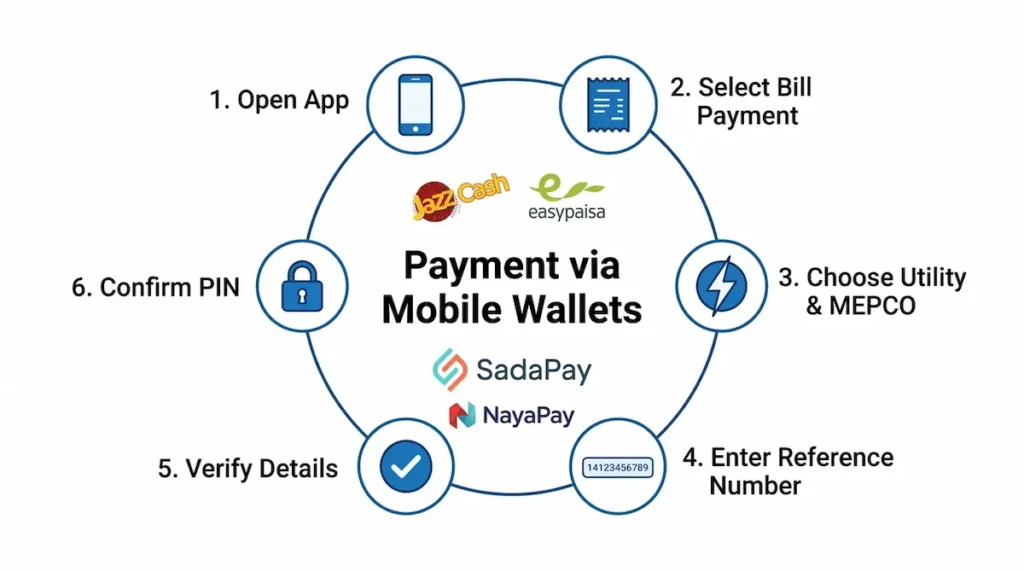
Payment via Mobile Wallets (JazzCash, EasyPaisa, SadaPay, NayaPay)
- Open your JazzCash, EasyPaisa, SadaPay, or NayaPay mobile application.
- Select Bill Payment or Utility Bills from the main menu.
- Choose Electricity as the utility type and select MEPCO as your distribution company.
- Enter your 14-digit reference number (without spaces or dashes).
- Verify that the consumer name and payable amount match your current paper or online statement.
- Confirm the transaction using your mobile account PIN or biometric verification.
Payment via Bank Applications & ATMs
All commercial banks in Pakistan—including HBL, UBL, MCB, Meezan Bank, Bank Alfalah, and Allied Bank (myABL)—offer free utility bill payments through their mobile apps and ATMs.
- Online Banking Workflow: Log into your bank app, select Bill Payments, add MEPCO under utility billers, type your 14-digit reference number, verify account details, and complete payment after One-Time Password (OTP) verification.
- Over-the-Counter Channels: Bills can be paid at designated commercial bank branches or post offices; ATM/card payments are a separate electronic payment option where available.
Verification & Security Protocols Before Confirming Payment
Before authorizing any digital transaction, double-check the following items on your screen:
- Biller Identity: Ensure the selected biller is explicitly listed as MEPCO.
- Reference Matching: Confirm that the 14-digit reference number matches your specific account.
- Bill Amount: Verify that the displayed amount matches your statement.
- Receipt Archiving: Always save or screenshot the digital payment confirmation receipt. Payment records can take 24 to 48 hours to update on PITC database servers, and your digital receipt serves as official proof of payment in the interim.
Correcting Billing Errors & Lodging CCMS Complaints
If your bill contains a misread meter digit, incorrect tariff category, or unexplained surcharge, you can file a formal dispute through official administrative channels.
Registering a Meter Reading Complaint on CCMS
- Capture Meter Evidence: Take a clear, well-lit photograph of your physical electricity meter display, ensuring the numerical digits and meter serial number are readable.
- Access the Complaint Portal: Visit the official Customer Complaint Management System at
ccms.pitc.com.pk. - Submit Verification: Enter your 14-digit reference number and mobile phone number to receive a One-Time Password (OTP) via SMS.
- File Complaint Details: Select Billing Complaint as the category, enter the actual meter reading shown in your photo, upload the meter image, and click submit.
- Save Ticket ID: Record the unique complaint ticket number provided upon submission to track resolution progress online.
Escalating Disputes to NEPRA & Federal Mohtasib
Complaints filed through CCMS are auto-acknowledged within 24 hours, and the published service standard is resolution within 14 days from the date of receipt. Complaints needing complex investigation may take longer, and you will be notified of any extension.
- NEPRA Consumer Affairs: First raise the matter with MEPCO. If MEPCO fails to redress your grievance or unjustly turns down the complaint, you can file the matter with NEPRA.
- Federal Mohtasib: You can also file a free administrative grievance online with the Federal Ombudsman at
mohtasib.gov.pk. No legal representation is required, and cases involving government utility services are reviewed directly.
Handling Detection Bills
A detection bill is served in addition to the normal consumption bill when a meter discrepancy is uncovered or when theft or other unauthorized electricity use is detected.
- Disputing Detection Charges: If you dispute a detection bill, the appellate forum for its revision is the DISCO Review Committee, and the consumer must be given a personal hearing by the committee.
MEPCO Regional Service Coverage & Customer Helpline Directory
Multan Electric Power Company provides electricity distribution and supply across 13 districts in South Punjab. If you encounter localized power outages, voltage fluctuations, or billing discrepancies, contact your local regional circle customer service office directly.
MEPCO Circles Across South Punjab
The table below lists MEPCO’s primary administrative circles, district coverage, and direct landline contact numbers:
| Operation Circle | Districts Served | Circle Office Landline |
|---|---|---|
| Multan Circle | Multan | 061-9220258 |
| Khanewal Circle | Khanewal | 065-2502411 |
| Vehari Circle | Vehari | 067-9201109 |
| Sahiwal Circle | Sahiwal, Pakpattan | 040-9330303 |
| Bahawalnagar Circle | Bahawalnagar | 063-9240040 |
| Bahawalpur Circle | Bahawalpur, Lodhran | 062-9250109 |
| Rahim Yar Khan Circle | Rahim Yar Khan | 068-9230158 |
| Dera Ghazi Khan Circle | Dera Ghazi Khan, Rajanpur | 064-9260229 |
| Muzaffargarh Circle | Muzaffargarh, Layyah | 066-9200064 |
Customer Complaint Center Phone Numbers
- Toll-Free MEPCO Helpline:
0800-63726(Available 24/7 for load shedding inquiries, line faults, and billing support) - MEPCO Complaint Call Centre:
118(For immediate electrical hazards, transformer failures, or downed power lines) - SMS Bill Query Service: Type
PITCfollowed by a space and your 14-digit reference number (e.g.,PITC 12345678901234) and send it to shortcode8334.
Frequently Asked Questions
How can I check my MEPCO bill online?
Enter your 14-digit reference number or 10-digit consumer ID into the search tool at mepco-bill.pk and click Check Bill. Your duplicate MEPCO bill will open directly from official Power Information Technology Company servers.
Can I check my MEPCO bill online using my CNIC?
No. The official PITC database supports searches using a 14-digit reference number or 10-digit consumer ID only. CNICs are used in person at local MEPCO offices or via phone helplines (0800-63726) to trace lost reference numbers.
What is the difference between a Reference Number and a Consumer ID?
The reference number is a dedicated number allotted to a consumer for identification and includes a sub-division component; the meter number is a separate billing field. The 10-digit consumer ID is a permanent account number assigned to the customer account. Both numbers retrieve the same bill.
Is a duplicate MEPCO bill valid for bank payment?
Yes. A duplicate bill printed online carries the same reference number, barcode, due date, and payable amount as the original paper bill. It is accepted by commercial banks, Pakistan Post offices, and mobile wallet payment agents.
What makes a domestic consumer “Protected” in MEPCO?
A residential consumer who uses 200 units or fewer per month for six consecutive billing cycles is classified as Protected, qualifying for lower subsidized base rates. Exceeding 200 units in any month removes protected status for six months.
How do I check my MEPCO bill via SMS?
Open your mobile messaging application, type PITC followed by a space and your 14-digit reference number (e.g., PITC 12345678901234), and send the text to shortcode 8334.
What should I do if “Bill Not Found” appears?
Verify that all 14 digits of your reference number are entered correctly without spaces or dashes. Ensure you have selected the Consumer ID tab if using a 10-digit number, or check if the current month’s bill has been issued yet.
Where can I file an online complaint about a wrong meter reading?
Take a clear photograph of your physical meter display and submit a formal complaint online through the official Customer Complaint Management System at ccms.pitc.com.pk.
What are MEPCO peak electricity hours?
Peak hours are daily 4-hour windows with higher electricity demand. In summer (June to August), peak hours run from 7:00 PM to 11:00 PM. In winter (December to February), they run from 5:00 PM to 9:00 PM.
Does mepco-bill.pk charge any fee or store my reference number?
No. The billing search utility is completely free. Reference numbers entered into the search tool are transmitted directly to official PITC servers and are never saved on our web servers.
Disclaimer
mepco-bill.pk is an independent informational utility website providing quick access to public electricity billing records served directly by the official Power Information Technology Company (PITC) portal. This website is not affiliated with, endorsed by, or connected to Multan Electric Power Company (MEPCO), WAPDA, PITC, NEPRA, or the Government of Pakistan. We do not issue bills, collect payments, or store consumer financial data. All bill queries redirect directly to official PITC servers.