MEPCO New Connection 2026 — Application, Fees & Tracking
To apply for a new MEPCO electricity connection, submit an online application through the official Electricity New Connection portal (ENC). Upload your CNIC copy, property ownership proof, wiring test report, and a neighbor’s 14-digit bill reference number. After physical file verification at your local Sub-Divisional Officer (SDO) office, MEPCO issues a computer-generated Demand Notice. Once paid at a designated bank, the connection must be installed within 20 days of payment of the Demand Notice for loads up to 15 kW (34 days for loads above 15 kW up to 70 kW).
Mandatory Documents for MEPCO New Meter Application
Preparing complete legal and technical documentation before starting your application prevents processing delays or file rejection at the local sub-division office.
Required Document Checklist
To submit a new electricity connection file, you must prepare attested physical copies of identity, property ownership, and technical safety documents:
- Applicant & Witness CNICs: Attested photocopies of Computerized National Identity Cards for the primary applicant and two witnesses.
- Property Ownership Proof: Copy of the registered sale deed (Registry), Fard-e-Malkiat, or official property allotment letter proving legal title.
- Neighbor’s Electricity Bill: Copy of a recent paid electricity bill from an adjacent active meter showing a valid 14-digit reference number.
- Wiring Test Report: Electrical safety test certificate issued, signed, and stamped by a licensed electrical practitioner or contractor.
- Legal Affidavit (Rs 100 Stamp Paper): Sworn undertaking declaring that no previous unpaid MEPCO utility arrears or illegal connections exist on the premises.
- No Objection Certificate (NOC for Tenants): Written permission letter signed by the property owner along with a copy of the landlord’s CNIC (required only if the property is rented).
Step-by-Step Online Application Process via ENC Portal
All ex-WAPDA distribution companies (XWDISCOs) process new connection applications through the central Electricity New Connection system.
1. Filling the Online Form on enc.com.pk
- Visit the official web portal at enc.com.pk.
- Select MEPCO as your distribution company from the drop-down menu.
- Choose your administrative circle, division, and specific local sub-division office covering your property location.
- Select your connection category: Domestic (A-1a), Commercial (A-2), Industrial, or Agricultural Tube Well.
- Select the requested load capacity (e.g., Single Phase up to 5 kW, or Three Phase for loads exceeding 5 kW).
- Enter personal details: Applicant full name, father/husband name, CNIC number, active mobile number, and complete property installation address.
- Enter the 14-digit reference number from your neighbor’s active connection to help line superintendents identify your local distribution transformer.
2. Uploading Scanned Documents & Generating Tracking ID
- Upload clear scanned copies (PDF or JPEG format under 300 KB each) of your CNIC, property ownership document, wiring test report, and neighbor’s bill copy.
- Submit the digital form. The system generates a unique Tracking ID (e.g.,
15411015720). Save or print this Tracking ID immediately for application status tracking and printing your application copy.
3. Physical File Submission at the SDO Office
Print the computer-generated application form from enc.com.pk. Attach physical copies of your CNIC, ownership proof, test report, neighbor bill, and the Rs 100 stamp paper affidavit. Submit the complete paper file to your local MEPCO Sub-Divisional Officer (SDO) customer facilitation desk.
Understanding MEPCO Demand Notice Fees & Security Costs
After physical file submission, a Line Superintendent (LS) inspects your premises to confirm safety clearance and estimate technical requirements. Upon site approval, MEPCO issues an official computer-generated Demand Notice.
Components of a Demand Notice
A Demand Notice itemizes the mandatory fixed expenses required before meter installation:
- Security Deposit: A refundable risk deposit calculated according to requested load capacity (kW) and connection category.
- Service Line Cost: Fixed lump-sum charges covering service cable length from the nearest Low Tension (LT) distribution pole to your premises.
- Meter Equipment Cost: Physical meter procurement fees, including advanced Single Phase AMI Smart Meter charges where applicable.
- Store Charges: Standard administrative testing and store processing fees.
Estimated Cost Breakdown
Note: Final Demand Notice fees increase if installation requires additional distribution poles, conductor spans, or dedicated transformer capacity. Once paid at an authorized bank branch, submit a copy of the paid Demand Notice receipt to the SDO office to authorize meter issuance.
How to Track MEPCO New Connection Application Status
Applicants can monitor application progress online using official database portals.
Online Tracking Steps
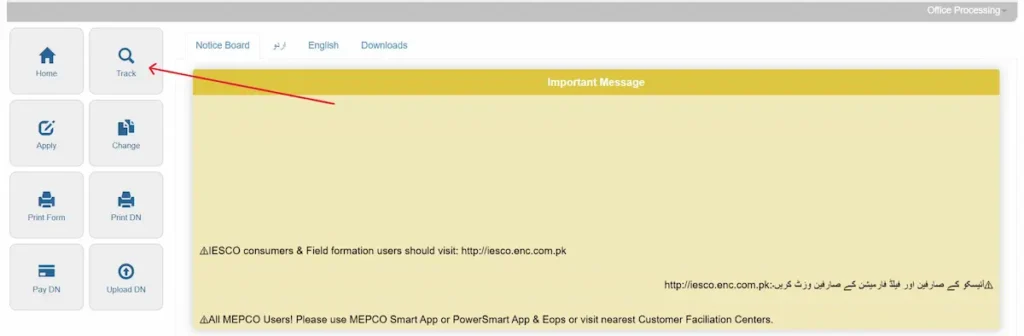
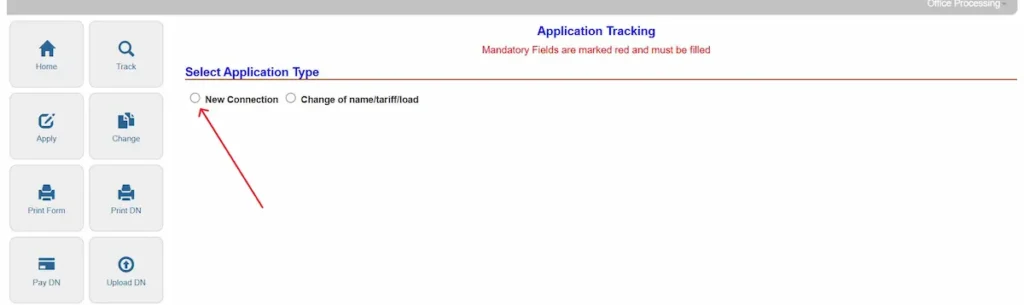
- Select New Connection as the application type.
- Choose MEPCO from the company list.
- Enter your 11-digit Tracking ID or applicant CNIC number (without dashes).
- Click Submit to view current processing stages (e.g., Application Submitted, Site Inspection Complete, Demand Notice Issued, Payment Verified, or Meter Issued).
Once your meter is operational, you can estimate your upcoming monthly energy costs using our MEPCO bill calculator or view monthly duplicate statements to check MEPCO bill records online.
Meter Installation Timelines & Physical Verification
MEPCO operates under Consumer Service Code timeframes set by the National Electric Power Regulatory Authority (NEPRA).
- Category 1 Connections (Load up to 15 kW): Service lines located within 40 meters of existing distribution poles are required to be installed within 20 days of Demand Notice payment.
- Category 2 Connections (Load above 15 kW up to 70 kW): Connections requiring minor distribution network adjustments or pole extensions must be completed within 34 days of Demand Notice payment.
- Site Delays: If meter installation exceeds the NEPRA time frame (20 days for loads up to 15 kW, or 34 days for loads above 15 kW up to 70 kW) after Demand Notice payment, present your paid receipt copy directly to your local Executive Engineer (XEN) office or file an inquiry via the toll-free helpline at 0800-63726.
Extension or Reduction of Sanctioned Load
Existing consumers modifying active property connections must update official PITC records through specific administrative procedures.
Transferring a connection into a new owner’s name is a separate procedure from a new connection, with its own document list and a ten-day processing period. See the full MEPCO bill name change guide.
Extension or Reduction of Load
If adding heavy appliances like inverter air conditioners increases your total power demand beyond your original sanctioned load, apply for an Extension of Load.
- Procedure: Submit an online load extension request on
enc.com.pkor visit your local Customer Facilitation Center. MEPCO issues a supplemental Demand Notice for additional security deposit and cable capacity upgrades.